How digital wedding invitations work
An Elzoka invitation is a web page your guests open from one WhatsApp link, with no app to download. You choose a design and pay, we make it by hand in 24–48 hours, and it reaches your guests only after you approve it.
- Ready in
- 24–48 hours
- Changes
- 2 rounds included
- Events
- Up to 10
- Language
- Any Indian language
- Step 1
Choose your wedding invitation design
Every design has its own page where the real invitation runs in a phone, so you can try it before you buy. Every design is the same price and can be made in English or any Indian language.
- Hindu, Muslim and Christian designs
- Add its film for WhatsApp Status and Reels, where a design has one
- Extras, if you want them, added at checkout
- Step 2
Pay online in a minute
Add your name and WhatsApp number, then pay securely through Razorpay with UPI, a card or net banking. There is no account to create: a private link opens your own page.
- One price per invitation, never per guest
- Your receipt is on your page, ready to save
- Step 3
Send your wedding details, or a photo of your card
On your page, fill in names, dates and venues step by step, at your own pace. If typing is a nuisance, send a photo of your printed card and we type it in for you.
- The couple's names, spelled the way you want them
- Your parents' names, if they appear on the invitation
- Each event with its date and time, up to 10
- Each venue, with a map link or an address
- Photographs, if your design uses them
None of it has to arrive at once.
- Step 4
We make it by hand, you approve the preview
We set everything into your design by hand. Within 24–48 hours of your details being confirmed, the real invitation is ready on your phone to check. Ask for a change, or approve it.
- Two rounds of changes included, before or after it goes live
- Our mistakes are fixed free, however many times it takes
- Nothing reaches your guests until you approve
- Step 5
Share one link on WhatsApp
Once you approve, your invitation is live. Send one link on WhatsApp, print the QR code on your cards, and post your film to Status and Reels. Guests open it in their browser, with no app.
- Guests can forward it to family
- Hidden from Google: only people with the link can open it
- Want it switched off? Ask us and we do it
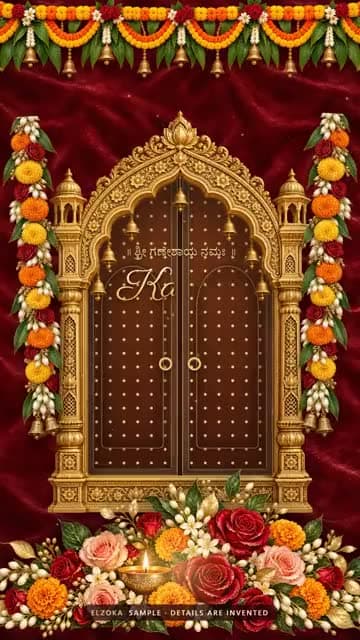
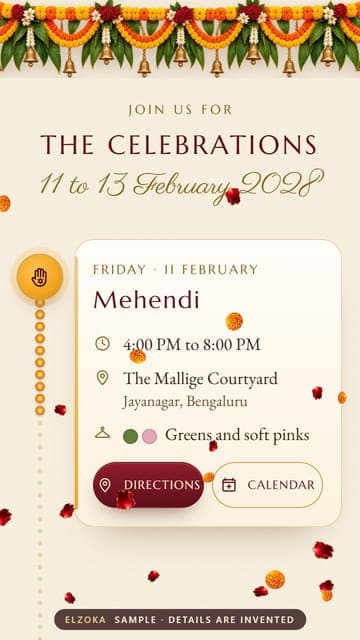

What guests see when they tap your link
- Opens like a real card
- Directions to every venue
- Add to calendar
- A live countdown
- No app needed
- Any Indian language
Who can see your invitation
Only the people you send it to. Every invitation is hidden from Google and has a long, random web address. Guests can forward it on WhatsApp, and if you want it switched off, ask us and we do it.
Questions about the process
Do we need to create an account?
No. After you pay, a private link opens your own page, where you send your details, check the preview and find the link to share. There is no password to remember.
When do the 24–48 hours start?
From when your details are confirmed, not from when you order. We cannot set an invitation before we know what goes in it, so the sooner your details arrive, the sooner you see it.
How many events can one invitation hold?
Up to 10: the Haldi, Mehendi, Sangeet, wedding, reception and more. Each event has its own date, time, venue and map, so guests find every place.
Can we change something after the invitation is live?
Yes. Two rounds of changes are included in total, before or after it goes live. A mistake of ours is not a change: we fix it free, however many times it takes. Extra rounds are priced before any work starts.
We only have our printed card. Is that enough?
Yes. Send a photo of it from your page and we type everything in. You check every word in the preview before your guests see it.
Can we add a film to our invitation?
Yes, for designs that have one: add its film when you order. We make it after you approve your invitation, and it arrives on your page, ready for WhatsApp Status and Instagram Reels.
Which languages can our invitation be in?
English or any Indian language, including Hindi, Kannada, Tamil, Telugu, Malayalam, Marathi, Bengali, Gujarati and more. We set the words by hand, and you check them in the preview.